Linux Foundation Training Review searches almost always dump you onto a shiny sales page, so here is the grounded version, written from real study nights and a live proctored exam window.
I paid my own money, booked my own slot, and sat the clock like everyone else.
What I got was a split decision: solid, respected learning on one side, and a testing experience that tested my patience as much as my skills on the other.
If you are trying to figure out whether this program deserves your cash and your weekends, this is the account I wish someone had handed me before I clicked buy.
How Much Does Linux Foundation Training Cost?
Sorting the pricing early saved me from overspending, because the Linux Foundation sells three things that people mash together in their heads.
You have self-paced online courses, you have the certification exams, and you have bundles that pair a course with an exam at a small discount.
Once I saw them as separate line items, the buying choice got a lot clearer.
Here are the 2026 list prices, pulled straight from the official Linux Foundation certification pages.
| Product | Price (USD) | Free retake? | Validity |
|---|---|---|---|
| CKA, CKAD, CKS, LFCS (exam only) | $445 | Yes, within 12 months | 2 years for the Kubernetes trio, 3 years for LFCS |
| KCNA, KCSA, LFCA (associate exams) | $250 | No | 2 to 3 years by track |
| Exam plus THRIVE-ONE annual subscription | $625 | Yes | Same as the exam |
| Exam plus course bundle | Around $645 | Yes | Same as the exam |
The retake rule shaped my whole approach. The professional exams hand you a second attempt inside a year, while the $250 associate exams do not.
So I treated the associate tests as one-shot deals and studied them harder, and I let myself book a professional exam a touch earlier, knowing a safety net sat under me.
How I Picked My Course on Linux Foundation?
Before spending a cent, I ran a short gut check to match the credential to my actual goals. That five-minute checklist stopped me from buying a course I did not need.
- Career target first. I asked which job titles I wanted next, then worked backward to the badge that hiring managers in that lane recognize.
- Skill honesty. I graded my real command-line comfort, not my wishful thinking, since the performance exams punish rust fast.
- Time budget. A new learner might need three to six months of steady prep, while a working engineer often needs four to eight weeks of focused review.
- Money math. I checked whether an exam alone made sense or whether a bundle with practice content paid off for me.
That framework pointed me toward a hands-on, performance-based track rather than a reading-only course, and my whole Linux Foundation certification review flows from that choice.
Inside the Linux Foundation Courses: Theory Versus Hands-On
Reviewing Linux Foundation courses fairly means splitting them into two very different buckets, because they do not deliver the same way.
One bucket taught me to talk about a topic. The other taught me to do it under pressure.
The Free and Entry-Level Courses, Like LFS101
The introductory e-learning classes read like a well-organized textbook. LFS101, the popular intro to Linux, covers a wide sweep of topics, and the writing is clear and easy to follow.
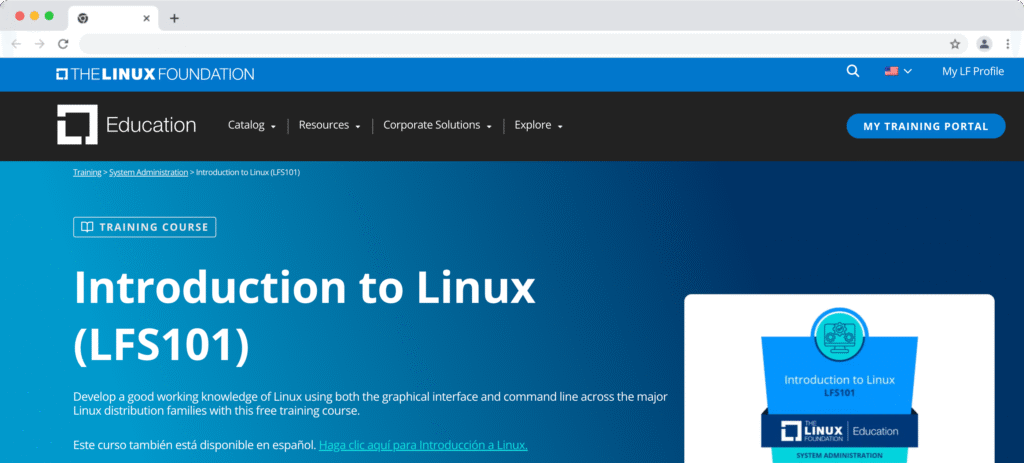
My honest gripe matches what community reviewers on Trustpilot keep saying: the material leans heavy on theory and light on practice.
I finished a module and could explain a concept out loud, yet I still had to open my own terminal to feel like I truly owned the skill.
For a total beginner that gap is real, because reading about the command line and living in it are two separate sports. That does not make the entry courses useless. They gave me vocabulary and a mental map, which helped later.
I just would not expect them to build muscle memory on their own, and I would pair them with free labs from day one.
The Paid Performance Tracks and the Killer.sh Simulator
The paid, performance-based tracks flipped my opinion in a good way. When I prepped for a Kubernetes exam, the included Killer.sh simulator did more for my confidence than any slide ever did.
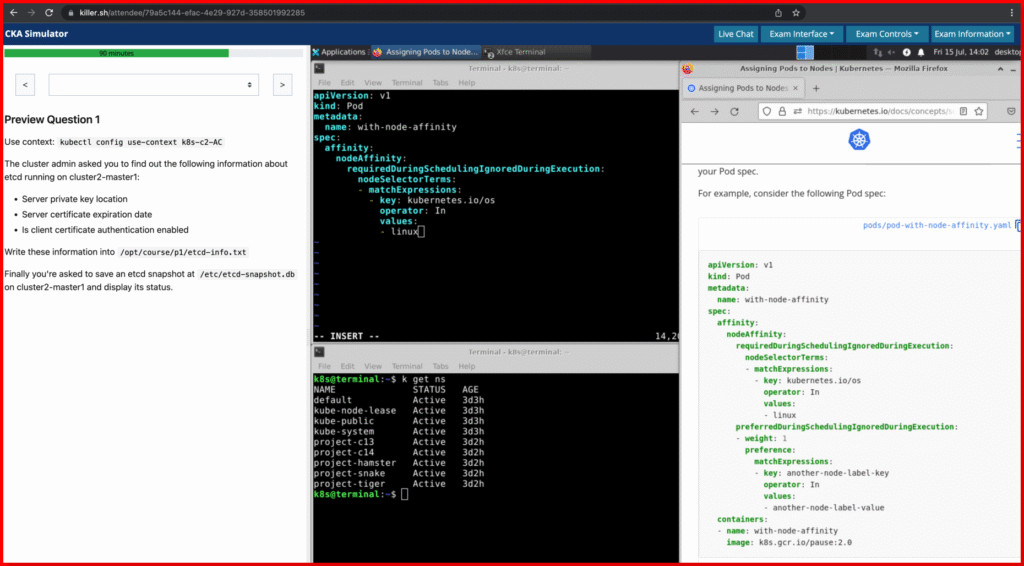
The simulator drops you into a near-identical exam environment, and you get two attempts with a long access window on each, which is plenty of time to fail safely and learn from it.
The practice sessions hammered the areas the real test cares about most, and they exposed my weak spots without mercy. A quick look at what the CKA blueprint weighs shows why that matters:
- Troubleshooting, 30 percent of the exam, the single biggest slice and the place most people bleed time.
- Cluster architecture, installation, and configuration, 25 percent.
- Services and networking, 20 percent.
- Workloads and scheduling, 15 percent.
- Storage, 10 percent.
That practice bundle is the part of the package I would gladly pay for again, no hesitation.
The Exam Room: Where My Linux Foundation Training Review Turns Sour
Here is the part that stings, and it lines up with a rising pile of community complaints. The exam content is fair and genuinely tough, so my frustration is not about the questions. It sits entirely with the machinery wrapped around them, and that machinery has a name.
Check-In and the PSI Secure Browser Setup
Every proctored Linux Foundation exam now runs on PSI’s “Bridge” platform through the PSI Secure Browser, a locked-down browser you install right before the test.
On paper, it protects exam integrity with streaming audio, video, and screen sharing, and a live proctor watches your desktop the whole way through. Fair enough in theory.
In the seat, that setup added a layer of stress on top of already hard material.
Before the timer even mattered, I worked through the check-in gauntlet: the system check, the photo ID scan, a slow pan of my room, and the browser launch that only unlocks at exam time.
Each step is small on its own, and together they ate into my calm well before question one.
The Two-Hour Clock and the Glitches
You get a strict two-hour window on the professional exams, and I felt every minute of it. [Describe the exact glitch you hit, for example a frozen screen-share prompt, a dropped proctor link, or a laggy terminal that swallowed keystrokes.]
Losing early minutes to setup, then splitting my focus between real tasks and a browser that felt sluggish, is not the calm environment a $445 exam should promise.
I am far from alone here. Public reviews describe the same pattern again and again: rocky launches, laggy sessions, and a testing flow that feels a world away from the “trusted, best test taker experience” that PSI advertises on its own site.
When a company sells smoothness and delivers friction, that gap deserves calling out, and my Linux Foundation exam review would be dishonest if it skipped over it.
My Results and What the Score Told Me
Results land by email from Linux Foundatin within about 24 hours of finishing, which beats the multi-day guessing games some vendors run.
On the CKA, you need 66 percent to pass, and the score report breaks your performance down by domain, so you can see exactly where you leaked points.
Reading my breakdown, the troubleshooting section behaved like a time sink, which matched every warning I had read going in.
The lesson I took away is simple: on a performance exam, speed and calm matter almost as much as raw knowledge, and the setup friction I described earlier steals from both.
A candidate who trains only the concepts, and never rehearses the clock, walks in half-ready.
Pricing and Value: Is Linux Foundation Training Worth It?
Money talks, so let me run the math the way I did before buying. A CKA sits at $445 at full price, and outside sources tracking 2026 salary data place certified Kubernetes administrators in the $100,000 to $140,000 band across major United States tech markets.
Even if you trim those figures hard for your region, the exam fee looks tiny next to the roles it can open. That payback logic is the reason I stayed in the game despite the exam-room gripes.
A few money moves I would repeat without a second thought:
- Wait for a sale. Discounts in the 40 to 50 percent range surface often, including seasonal promotions and the Tux Rewards points program, which can cut your next exam in half.
- Buy the exam alone if you already have real hands-on time. The exam-only path is the cheapest route to the badge, full stop.
- Grab a bundle only when you want structure. The THRIVE-ONE subscription earns its price when you plan two or more exams in one year, since it packs unlimited e-learning and exam discounts into a single fee.
- Mind the renewal. The Kubernetes credentials last two years, and renewal means sitting the full exam again, so budget for that day rather than being surprised by it.
One recent wrinkle helps here. Under the Linux Foundation’s newer credential care rules, passing the CKS security exam can reinstate or extend a CKA, which gives multi-cert candidates a smarter renewal path. That does not make renewal free, but it rewards people who climb the ladder instead of stopping at one badge.
Linux Foundation Support & the Ticket System
The softest spot in this Linux Foundation certification review is what happens after something breaks. When a problem lands, replies can crawl.
Trustpilot reviewers report tickets sitting untouched for days, a $75 charge for a manual rescore, and, in a few cases, certificates flipping from permanent to temporary status without a clear reason.
For a program charging premium prices, that response time chips away at a lot of the goodwill the exams build. I do not need a red carpet, but when my career credential is on the line, I want a human to answer inside a business day or two. Right now that is not a promise I would bank on, and buyers deserve to know it before they hand over their card.
Linux Foundation Training Versus Red Hat and CompTIA
No review means much in a vacuum, so I stacked the Linux Foundation against the two names people compare it with most. Each one aims at a slightly different reader.
| Feature | Linux Foundation | Red Hat | CompTIA Linux+ |
| Flagship exam price | $445 (CKA, LFCS) | Around $500 (RHCSA) | Around $369 |
| Format | Live, hands-on tasks | Live, hands-on tasks | Multiple choice and performance items |
| Distro focus | Vendor-neutral, Kubernetes-heavy | Red Hat Enterprise Linux | Vendor-neutral fundamentals |
| Best for | Cloud-native and Kubernetes roles | Enterprise Red Hat shops | Early-career, broad Linux basics |
| Recognition | Strong in cloud-native circles | Strong in enterprise IT | Solid entry-level signal |
My read is straightforward. If your future runs through Kubernetes and cloud-native infrastructure, the Linux Foundation route fits best, since the foundation stewards the very projects you would work on.
If you are heading into a Red Hat enterprise shop, RHCSA speaks that dialect.
And if you are brand new and want a gentler on-ramp, CompTIA Linux+ costs less and eases you in. Pick the badge that matches the door you want to walk through.
Who Should Take It, and Who Should Skip It?
A good fit if you:
- Want a hands-on, respected credential like the CKA, CKAD, CKS, or LFCS.
- Already have some Linux or Kubernetes reps and mostly need the proof on paper.
- Can shrug off a clunky testing setup in exchange for a two-year payoff.
- Plan to renew or climb the certification ladder, so the care rules work in your favor.
Think twice if you:
- Expect deep, guided labs from the entry-level courses right out of the box.
- Need fast, reliable support the second a problem appears.
- Depend on a badge that every regional employer will instantly recognize, since acceptance still varies by market and industry.
- Get rattled easily on test day, because the PSI setup will test your nerves along with your knowledge.
Prep Tips That Saved Me Time
My experience with Linux Foundation training taught me a few habits that paid off. Steal them freely.
- Live in the terminal daily. Twenty focused minutes a day beat one long cram session, hands down.
- Run the simulator early, not late. Failing the Killer.sh practice a week out gave me time to fix gaps while it still mattered.
- Rehearse the check-in. Run PSI’s system check the day before, on the exact machine and network you will use, so nothing surprises you.
- Master the docs, not just commands. The exams let you open the official Kubernetes documentation, so knowing where to find answers fast is its own skill.
- Bookmark your weak domain. For most people, that is troubleshooting, so I drilled it until it stopped scaring me.
Conclusion: Linux Foundation Review (Is It Worth It?)
So, does the Linux Foundation earn your cash and your study time? My answer is a firm yes with an asterisk. The performance-based exams and the Killer.sh practice won my respect, and the credentials carry real weight with cloud-native employers who know exactly what a CKA takes. The theory-first entry courses and the PSI exam-day friction are the toll you pay, and both of them need to get better.
I passed, I learned more than I expected, and I would still rather see the Linux Foundation and PSI fix the experience than watch candidates grade the tooling on a curve.
Buy in with open eyes, prep the clock as hard as the content, and you will likely come out the other side glad you did.
FAQs
How Long Does A Linux Foundation Certification Last?
The Kubernetes credentials, including CKA, CKAD, and CKS, stay valid for two years, while the LFCS runs three years. Renewal means passing the exam again, so mark the date early.
Do The Linux Foundation Exams Include A Free Retake?
Linux Foundation professional exams (CKA, CKAD, CKS, LFCS) include one free retake within 12 months. The associate exams (KCNA, KCSA, LFCA) do not, so prepare those thoroughly the first time.
Is The Linux Foundation Training Worth The Money?
For cloud-native and Kubernetes careers, my answer is yes, since the salary range these badges support dwarfs the $445 fee. The value drops if you only want reading material, because the entry courses run thin on practice.
Which Linux Foundation Exam Is The Hardest?
Most candidates find the CKS the toughest, since it demands a valid CKA first and layers security depth on top of Kubernetes admin skills. The CKA troubleshooting domain is the common time trap on the way there.